A domain is the name of a website. It is the address that users type in to open your website.


How to Choose a Domain Name and Web Hosting for a New Website

Kris
5 May, 2026
·
read in 28 minutes
Table of contents
Choosing a domain and hosting is one of the first important steps in creating a new website. The domain is the name people will use to find you online. Hosting is the technical environment in which the website will operate.
If these two decisions are made hastily, problems will arise later. The website loads slowly, emails don’t work reliably, migration becomes difficult, or the business is left with a domain that doesn’t sound good and is hard to remember.
That’s why choosing a domain and hosting isn’t just a technical task. It affects the brand, SEO foundation, speed, security, and future development of the website.
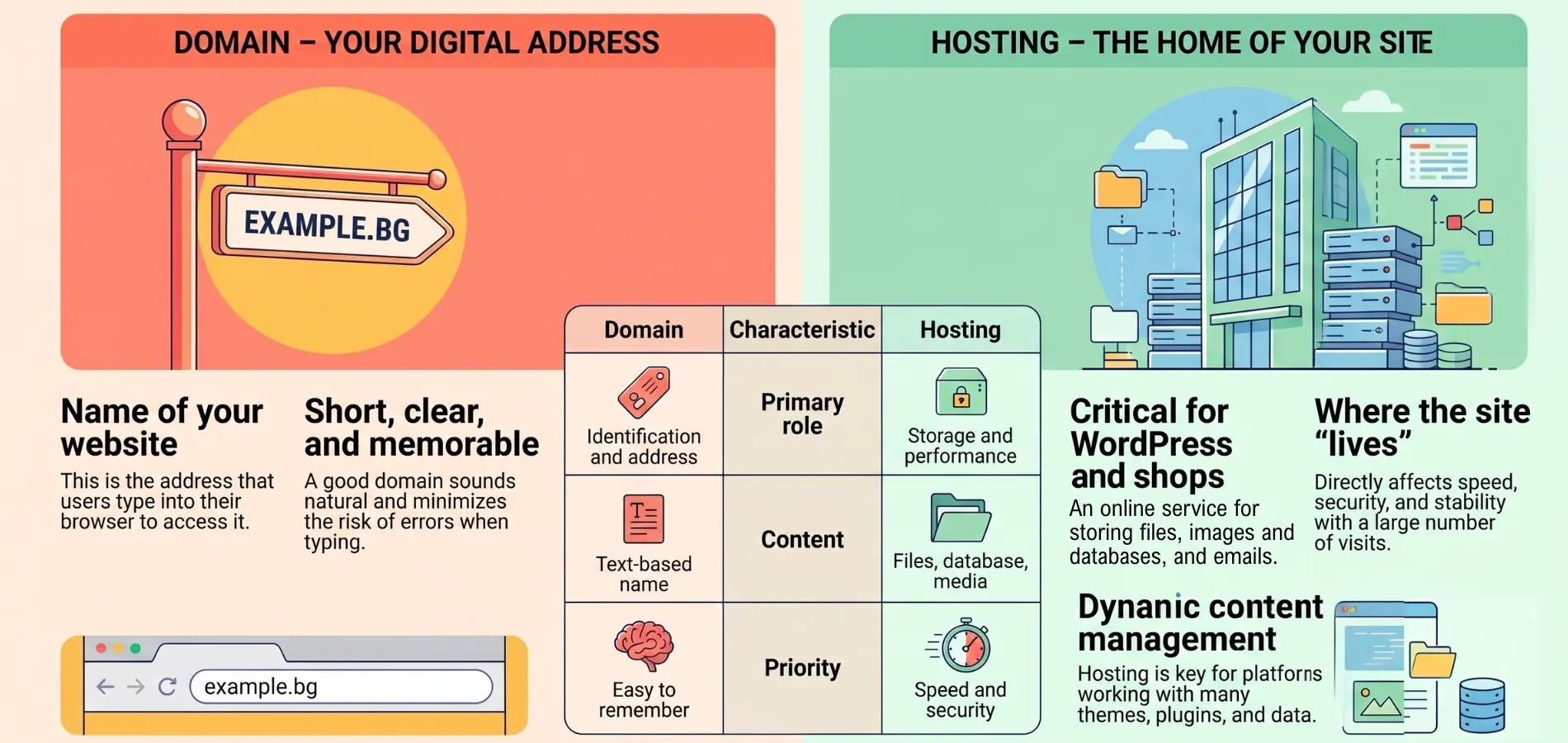
What are domains and hosting?
|
Element |
What is |
Example |
Why it is important |
|
Domain |
The domain is the name of the website. This is the address that the user types into the browser to open your website. |
example.bg |
A good domain name should be short, clear, and easy to remember. It should sound natural when you say it over the phone, in a meeting, or in an advertisement. If people wonder how exactly it is spelled, the risk of errors increases. |
|
Hosting |
Hosting is the service that stores and loads a website online. It contains the files, images, database, content management system, and often company emails. |
Hosting plan for a WordPress website or online store |
The quality of hosting affects the speed, stability, security, and performance of the website during high traffic. For a WordPress website or online store, this is particularly important because the platform works with a database, themes, plugins, and dynamic content. |
How They Work Together
The domain and hosting function as an address and a storage space. The domain directs the user to the website. Hosting provides the environment from which the website loads.
To the visitor, it all looks like a single process. They type the website’s name, and the page opens. Behind the scenes are DNS settings, a server, a database, an SSL certificate, and other technical elements.
If any of these elements are not configured properly, the site loads slowly, displays errors, or doesn’t open at all.
Why choosing a domain is important right from the start
It affects the brand
The domain is often the first point of contact between the user and the business. If the name is clear, short, and closely related to the brand, people remember it more easily.
For a corporate website, the best choice is often the company or brand name. For a new project, it’s a good idea to think not only about today’s service but also about future development.
If the domain is too narrowly defined, it will eventually start to limit the business. For example, a domain that includes only one specific service is not a good choice if you are planning a broader portfolio.
It affects the SEO foundation
The domain name alone does not guarantee rankings on Google. However, a short domain name, stable hosting, good speed, and proper technical settings help the site have a better foundation.
Hosting affects loading time, accessibility, and the site’s performance under load. If the server is weak, even a well-built website will have problems.
SEO starts with the technical foundation. That’s why the domain, hosting, structure, and development must be considered together.
It affects future development
Cheap or unsuitable hosting often seems acceptable at first. Problems arise when the website starts to grow. More pages, products, images, forms, integrations, and visits are added. If the environment isn’t prepared, the site becomes slow and unstable.
This leads to additional costs, migration, and the risk of downtime. It is better to plan the right foundation before launch.
How to choose the right domain for a new website
Choose a short and clear name
A short domain name is easier to remember. It’s faster to type and reduces the risk of mistakes.
A good domain name is one that lets people know what your business is about right away. If you have to explain it at length, it’s probably not a good choice.
Avoid long phrases, complex transliterations, and words that can be spelled in multiple ways. This is important for Bulgarian brands because spelling in Latin script often causes confusion.
Avoid numbers and unnecessary symbols
Numbers and hyphens often cause confusion. When you say the domain out loud, the person on the other end needs to know whether the number is written as a digit or a word.
Symbols also make it harder to remember. The cleaner option is almost always better.
If the brand name is available as a domain without additional symbols, that is the best choice.
Align the domain with the brand
For a business website, the domain name should support brand recognition. If the brand name is clear, look for a domain that reflects it. The domain doesn’t always need to contain a keyword. Sometimes the brand name is a stronger choice than a long domain crammed with a service and location.
Example: If you’re creating a website for a company that offers multiple services, a domain with the brand name is more flexible than a domain focused on just one service.
Consider SEO, but don’t sacrifice brand recognition
A keyword in the domain name sometimes helps with clarity. This applies to niches where the user needs to immediately understand the site’s topic.
But overly long keyword domains often sound unnatural. They are hard to remember and don’t always build trust.
Check if the name resembles a foreign brand
Before registering, check if the name is similar to another business. This applies to domains, social media profiles, and marketing communications.
A similar name creates a risk of confusion. Users may end up on a competitor’s site or fail to clearly recognize your brand.
It’s also a good idea to check if the name is available on the major social media platforms. Consistency between the domain and profiles helps the brand.
Which extension to choose
|
Extension |
When is it appropriate |
For what types of websites is it a good choice |
What to keep in mind |
|
.bg |
When the business is primarily focused on the Bulgarian market |
Company website, local service, online store for Bulgaria, corporate website |
Demonstrates a local focus and is well-received by Bulgarian consumers |
|
.com |
When the project has an international focus or a plan for expansion outside Bulgaria |
SaaS product, startup, international brand, website in English |
The extension is familiar to a wide range of users and works well for broader communication |
|
.shop, .agency, .studio, and others |
When the extension fits the brand and is easily understood |
Online store, agency, studio, niche project, or creative brand |
Use it only if it doesn’t cause confusion. If it sounds strange or is hard to remember, it’s better to choose a more familiar option |
Does it make sense to buy more than one domain
In some cases, yes. For example, when you want to protect your brand, get both the .bg and .com versions, or cover common typos.
Additional domains should not create duplicate sites. They are usually redirected to the main domain. This way, you maintain a clear structure and avoid confusion for users and search engines.
How to choose the right hosting for a new website
Choose hosting based on your website type
Not every website has the same needs. A small business website, a blog, an online store, and a platform with user profiles all have different traffic loads.
A business website with just a few pages requires fewer resources. An online store with many products, filters, payment options, and integrations needs a more stable environment.
If you’re planning to create a new website, choosing a hosting provider should be part of the initial scope of work. This avoids a situation where the website is ready, but the technical environment is not suitable for it.
Check what resources you need
When reviewing hosting offers, don’t just look at disk space. The CPU, RAM, number of processes, databases, emails, inodes, and load limits are also important. Many plans look similar at first glance but differ in their actual limits. These limits affect speed and stability.
With WordPress and WooCommerce, you need to allocate resources for the theme, plugins, images, cache, and administrative tasks.
Pay attention to hosting speed
Website speed depends on several factors. These include hosting quality, the theme, the code, images, caching, and the database.
Hosting isn’t the be-all and end-all, but a weak server limits the site. If the initial environment is slow, optimization becomes more difficult.
For a business website, speed is important because it affects user behavior, queries, and the SEO foundation.
Check security
Every website must have an SSL certificate. This is a basic requirement for securing the connection between the user and the website.
It’s a good idea for your hosting to include automatic backups, protection against malicious code, access control, and easy recovery in case of a problem.
Security shouldn’t be left for a later stage. A single breach or technical error poses a risk to the website, data, and the business’s reputation.
Check the support
Good hosting support is important, especially if you don’t have an in-house technical team. If there is a problem with the website, emails, or the server, the response must be quick and clear.
Don’t just look at the price. Check what support channels are available, their response times, and whether they provide assistance with real-world issues.
For an active business website, it’s wise to also have a website maintenance plan, because hosting is just one part of the overall care. Updates, checks, backups, technical responses, and control over changes are necessary.
Types of hosting and when each is suitable
Shared hosting
Shared hosting is suitable for small business websites, blogs, and startup projects with moderate traffic.
It is affordable and easy to manage. Its main drawback is that resources are shared with other websites.
If your website is small and lacks complex features, this is a good starting point. As your site grows, it’s a good idea to monitor whether resources remain sufficient.
WordPress Hosting
WordPress hosting is suitable for sites built with WordPress. The environment is usually configured to work better with the platform.
Look for support for the latest PHP version, caching, SSL, backups, and easy database management.
This type of hosting is a good choice for corporate websites, blogs, and smaller WooCommerce stores.
VPS Hosting
VPS hosting provides more resources and control. It is suitable for higher-traffic websites, online stores, and projects with specific technical requirements.
It requires more technical expertise. If you don’t have someone to manage the environment, you should choose a managed VPS or external technical support.
Cloud hosting
Cloud hosting is suitable for websites that expect growth, higher traffic, or need flexible resources.
It offers better scalability but requires proper configuration and monitoring.
Dedicated Server
A dedicated server is a solution for large projects, heavy traffic, and specific requirements.
For most new websites, this is not a top priority. It makes sense for larger systems, platforms, portals, or high-traffic stores.
What to Look for in a Web Hosting Offer
First-year price and renewal price
Many offers seem like a good deal at first, but the renewal price is higher. Check the actual annual price after the initial period.
This is important because the domain and hosting are not a one-time expense. They are renewed every year.
Automatic Backups
Check whether the hosting provider performs automatic backups, how often they are done, and how long they are kept.
It is also important that restoration is easy. A backup is only valuable if the site can be quickly restored to a working state in case of a problem.
SSL Certificate
The SSL certificate must be enabled or easy to activate. Without it, the site appears insecure in the browser.
For online stores, contact forms, and user profiles, SSL is a mandatory requirement.
Email Services
If you plan to use business email accounts through the hosting provider, check the limits. It is important to know how many mailboxes are available, what the storage capacity is, and whether there is spam protection.
For more intensive email communication, it is often better to separate email from website hosting.
Hidden Limits
Don’t just look at the big numbers in the offer. Check the limits on processes, CPU, RAM, inodes, emails, and databases.
It is precisely these limits that often cause problems for WordPress sites with many plugins or for online stores.
Common mistakes when choosing a domain and hosting
Choosing based solely on the lowest price
A low price is attractive, but it shouldn’t be the only criterion. Slow hosting, poor support, and a lack of backups cost more in the long run.
For a business website, stability is more important than the minimal annual price difference.
Domain names that are too long
Long domains are hard to remember and are often misspelled. If the name contains several words, numbers, and complex transliteration, users can easily get confused.
It is better for the domain to be short, clear, and closely related to the brand.
Hosting without a growth plan
A website often starts small, but over time new pages, products, languages, a blog, forms, and integrations are added.
If the hosting provider lacks the resources for growth, migration will soon be necessary. This is an additional commitment and risk, especially for a live website.
Lack of access to accounts
The business must have control over the domain, hosting, and administrative access. If everything is registered to a third-party email or account, a risk arises.
The domain is an important asset. It must be under your control.
Missed Backups
Without regular backups, a single update error, plugin issue, or malicious attack poses a serious risk.
Backups should be performed regularly and kept for a sufficient period of time. It is a good idea to periodically check that they are working.
Domain and hosting for a WordPress site
What is important for WordPress
With WordPress, it’s important that your hosting provider supports the latest PHP version, a robust database, SSL, caching, and stable plugin compatibility.
The theme and plugins also affect speed. Even good hosting won’t compensate for a heavy theme, poor code, or too many unnecessary extensions.
What’s important for a WooCommerce store
A WooCommerce store has higher requirements than a standard corporate website. Products, shopping carts, payments, filters, and customer profiles put more strain on the system.
Here, resources, security, backups, and a stable database are important. With more products and visits, standard shared hosting is often insufficient.
When standard hosting is not enough
Standard hosting is not sufficient for many products, heavy filters, reservation systems, user profiles, ERP integrations, or high traffic.
In these cases, you need to consider a more robust environment and technical support. This ensures the site runs stably and has a foundation for growth.
Life Hack
Quick checklist before purchasing
- Is the domain short?
- Is it easy to spell?
- Is the extension appropriate?
- Have similar names been checked?
- Do you have control over the account?
- Does the hosting include SSL?
- Are there automatic backups?
- Are the resources sufficient?
- Is it suitable for WordPress or an online store?
- Is the renewal price clear?
- Is there good technical support?
- Is there a plan for future development?
How Studio Kipo approaches choosing a domain and hosting for a new website
At Studio Kipo, we view the domain and hosting as part of the website’s overall foundation. Before launching, we review the project’s goals, the type of website, the necessary resources, SEO requirements, future development, and the maintenance approach.
With a new project, we don’t just look at whether the website will go live. What matters is whether it will load well, whether it will be easy to manage, whether it has a stable technical environment, and whether it will allow for development after launch.
This is especially important for corporate websites, WordPress projects, WooCommerce stores, and websites that rely on organic traffic and inquiries.
If you’re planning a new website and aren’t sure which domain and hosting to choose, the Studio Kipo team will help you make the right technical decision right from the start.
Request a quote or contact us to discuss what kind of website you’re planning and what foundation would be best for it.
Share


FAQ:
What is a domain?

Do the domain and hosting have to be from the same provider?
Not necessarily. The domain and hosting are separate services. Sometimes it’s convenient to have them with the same provider, but the most important thing is that you have access and control.
Does the domain matter for SEO?
Yes, but not in the way people often think. The name itself does not guarantee rankings. More important are the content, structure, technical foundation, speed, and authority.
What kind of hosting is suitable for an online store?
An online store needs more resources, a stable database, good security, and room for growth. For larger stores, a VPS or cloud environment is often a better choice.
Should I buy more than one domain?
It makes sense if you want to protect your brand by getting both the .bg and .com versions or to cover common typos. Additional domains are usually redirected to the main site.
What is web hosting?
Web hosting is the technical service that stores and loads your website online. It is where your files, database, and content are located.
Which is better for Bulgaria: .bg or .com?
For a business focused primarily on Bulgaria, .bg is the logical choice. For an international project, .com is often more suitable. If you have a strong brand, it’s worth considering both options.
What kind of hosting is suitable for a WordPress site?
For a standard WordPress site, high-quality shared or WordPress hosting with good speed, SSL, backups, and an up-to-date PHP version is suitable.
How much do a domain and hosting cost?
The price depends on the domain extension, the provider, the type of hosting, and the included services. It’s important to look not only at the initial price but also at the renewal price.
When should I switch hosting providers?
When the website loads slowly, frequently crashes, reaches its limits, support is unresponsive, or the project needs more resources.
About the author
Kris is a WordPress Expert with over 5 years of experience who solves complex tasks - from custom themes and plugins to integrations with external systems. He is known for rapid debugging, resilient code, and best practices for maintainability and performance.
Related articles
Why Responsive Design Is a Must for Your Website in 2026
An increasing share of website visits comes from smartphones, while users continue to browse through laptops, desktop computers and tablets. A website should maintain good readability, clear navigation and convenient interactions at every screen width. In 2026, responsive design forms part of the foundation of good user experience, technical SEO and effective online business presentation. A ...
Kris
Jul 26
·
17 minute reading
SSL certificate - all advantages and disadvantages
An SSL certificate is now a standard for every website, not an optional extra. It provides a secure connection between the user’s browser and the server where the website is hosted. When a website uses HTTPS, data is transferred in a more secure way and the browser does not show a warning that the connection is not secure.
The topic, however, is not limited to “having a padlock in ...
Kris
May 28
·
17 minute reading
How can you tell if your website needs a redesign?
How to tell whether your website needs a redesign
A website is often the first place where a client meets your business. If the website looks outdated, loads slowly, or does not guide the user toward a clear action, the problem is not only visual. This affects trust, inquiries, sales, and SEO results.
A redesign does not mean only a new visual appearance. ...
Kris
May 21
·
16 minute reading